
Tips for Organizing a Productive Home Workspace

Creating a productive home workspace is essential for anyone working remotely, studying, or managing personal projects. A well-organized area helps to improve focus, reduce distractions, and increase comfort, ultimately boosting your overall efficiency. Whether you have a dedicated room or a small corner in your living space, these tips will guide you in setting up a workspace that works for you.
Choose the Right Location
Finding an appropriate spot for your workspace is the first step. Consider these factors:
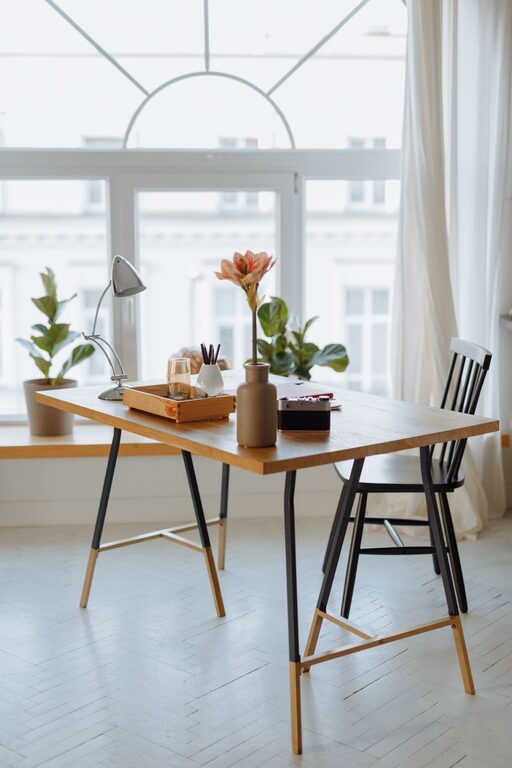
– Natural Light: Select a place near a window to benefit from natural light. It helps reduce eye strain and keeps you energized.
– Quiet Environment: Choose a location away from noisy areas to minimize distractions.
– Space Availability: Ensure there is enough room for your desk, chair, and equipment without feeling cramped.
– Privacy: If possible, pick a spot where others will not frequently interrupt you.
Invest in Ergonomic Furniture
Comfort plays a key role in productivity. Spending long hours in an uncomfortable chair or at a poorly sized desk can cause fatigue and discomfort. Here’s what to keep in mind:
– Ergonomic Chair: Use a chair that supports your lower back and allows you to sit with feet flat on the floor.
– Adjustable Desk: If possible, opt for a desk with adjustable height so you can alternate between sitting and standing.
– Monitor Position: Place your monitor at eye level to prevent neck strain.
– Keyboard and Mouse: Use ergonomic keyboards and mice to reduce wrist strain.
Keep Your Workspace Clutter-Free
A tidy space helps keep your mind clear and focused. Try these tips for managing clutter:
– Cable Management: Use clips and organizers to keep cords neat and untangled.
– Storage Solutions: Incorporate shelves, drawers, or containers to store supplies and documents.
– Daily Cleanup: Spend a few minutes at the end of each day clearing your desk.
– Limit Items: Keep only essentials on your desk to avoid distractions.
Organize Your Supplies Efficiently
Having your tools and supplies within easy reach saves time and prevents frustration.
– Desktop Organizers: Use trays, pen holders, and file sorters to keep items accessible.
– Digital Organization: Maintain well-structured folders on your computer and regularly backup important files.
– Labeling: Label storage bins and drawers for easy identification.
Set Up Proper Lighting
Besides natural light, proper artificial lighting is important to reduce eye strain:
– Task Lighting: Use a desk lamp with adjustable brightness for focused work.
– Avoid Glare: Position lighting sources to eliminate screen glare.
– Balanced Light: Combine overhead lights with task lighting for even illumination.
Create a Productivity-Friendly Environment
Your workspace ambiance affects how well you work.
– Personal Touches: Add plants, photos, or artwork that inspire you without over-cluttering.
– Temperature Control: Keep the room at a comfortable temperature to maintain focus.
– Noise Control: Use noise-canceling headphones or white noise machines if background noise is unavoidable.
– Set Boundaries: Communicate your work schedule to family or housemates to minimize interruptions.
Plan Your Workflow
Having a clear plan enhances productivity:
– Daily To-Do List: Write down tasks to keep track of priorities.
– Time Blocks: Allocate specific periods for focused work and breaks.
– Minimize Multitasking: Focus on one task at a time to improve quality and speed.
– Use Productivity Tools: Utilize apps and timers to manage tasks and time efficiently.
Maintain Regular Breaks
Taking breaks can prevent burnout and improve focus.
– Follow the 20-20-20 Rule: Every 20 minutes, look at something 20 feet away for 20 seconds to rest your eyes.
– Stretch: Stand up and stretch your body regularly.
– Move Around: Short walks or light exercises during breaks help refresh your mind.
Regularly Reassess Your Workspace
Your needs might change over time. Periodically revisit your setup to see if adjustments are needed. This may include rearranging furniture, upgrading equipment, or decluttering.
—
By following these tips, you can create a home workspace that helps you stay organized, comfortable, and productive. Remember, the best workspace is one tailored to your personal preferences and work style, so feel free to adapt these suggestions to suit your needs.
Related Post
Tips for Creating a Relaxing Home Workspace on a Budget
Discover easy, budget-friendly ways to design a calm and productive home workspace that fosters focus [...]

Tips for Creating a Cozy and Productive Home Office Space
Discover practical tips to design a home office that’s both comfortable and efficient, helping you [...]

Tips for Creating a Cozy and Inviting Reading Nook in Your Home
Discover easy tips to design a warm, inviting reading nook that makes diving into your [...]